
Overview of the “Settings” section
Which tabs there are in settings, who can open them and where to look for what — including the directories that live in the “Funnels” menu.
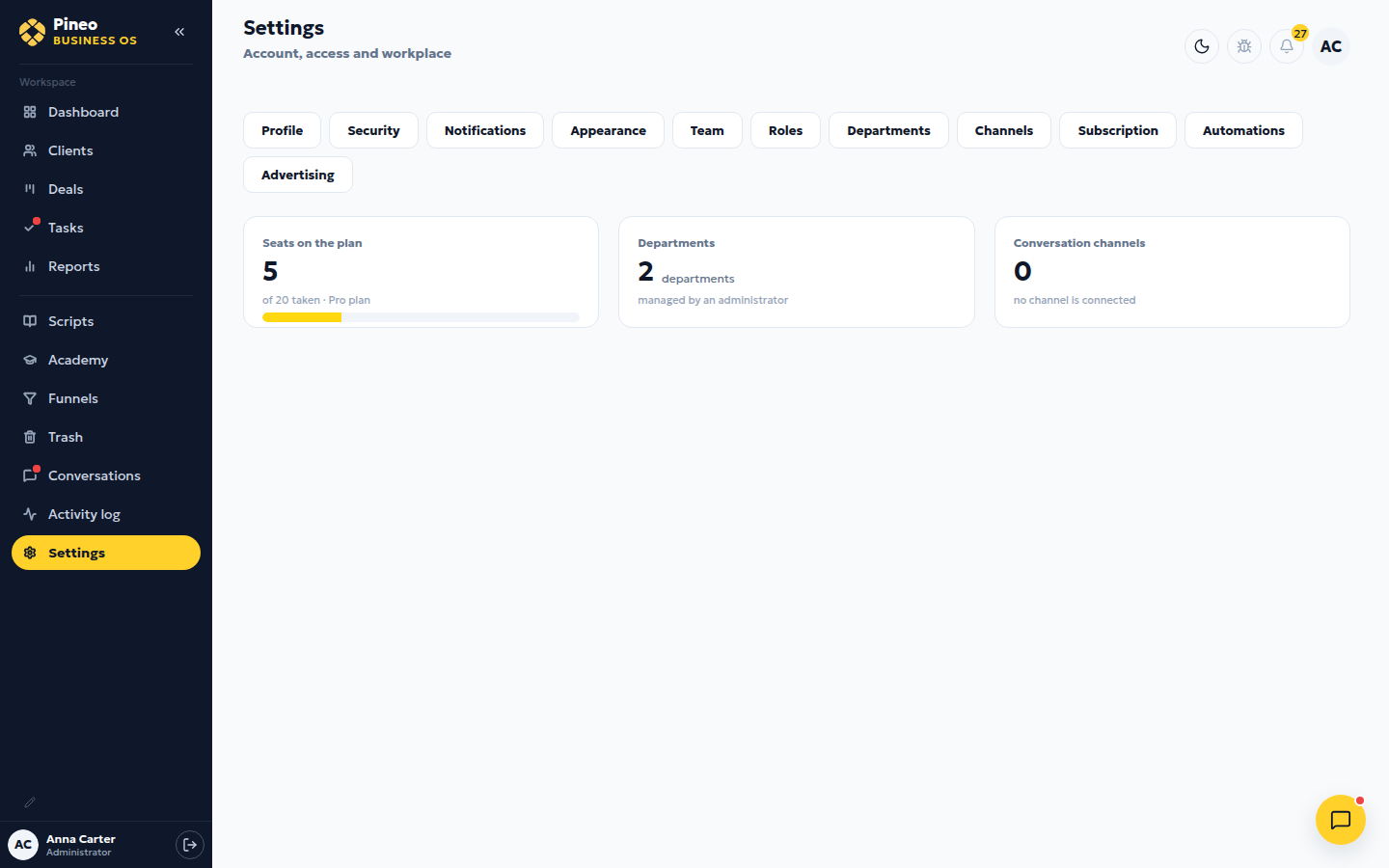
Tabs are shown according to rights: a tab you cannot open is not drawn at all.
| Tab | What it configures | Who can open it |
|---|---|---|
| Profile | Name, time zone, photo. More | Everyone |
| Security | Changing the password, signing out of all devices. | Everyone |
| Notifications | What arrives in the bell and by email. More | Everyone |
| Appearance | Language, theme, accent colour, font, density. | Everyone |
| Team | Inviting employees, role, supervisor, department, blocking. More | The administrator; roles with the “Employees” capability — within their scope |
| Roles | The permission matrix, capabilities, the owner for new enquiries. More | The administrator |
| Departments | The department structure and members. More | The administrator |
| Channels | The ChatApp cabinet, WhatsApp, Telegram and email lines. Cabinet, channels | The administrator; roles with the “Channels” capability (by default, the supervisor) |
| Subscription | Plan, seats, payments, disk space. More | The administrator |
| Automations | “Event → conditions → actions” rules and the log. More | The administrator; view — roles with the “Automations” capability |
| Advertising | Website enquiry forms, ad accounts, counters. More | Roles with the “Advertising and analytics” capability; only the administrator can change accounts |
What is outside the settings tabs#
Some settings are in the main menu on the left:
- Funnels — funnels and stages, loss reasons, lead sources, client types, tags, video categories, custom deal and client fields. The item is visible to roles with the “Funnels” or “Tags” capability. See Funnels and stages, Directories, Custom fields.
- Trash — restoring deleted things: Trash.
- Activity log — the history of actions for supervisors and administrators: Activity log.
Where the administrator starts#
- Invite employees and assign them roles.
- Create a funnel and stages, directories of loss reasons and sources.
- Connect the ChatApp cabinet and channels, and a website form if needed.
- Set up automatic deal creation: Inbound enquiries: what to set up.
The settings home page#
The administrator sees three summary cards: Seats on the plan (seats taken, “no plan configured” if none is assigned), Departments (how many and who manages them) and Conversation channels (how many are working, how many connected and how many need attention).
Was this article helpful?Thank you! If something is missing, write to us through support.